
Relocating to a new country, traveling for an extended period, or attempting to access region-locked mobile applications frequently prompts users to open their device settings and click “Change Country.” On paper, changing the regional storefront of your Apple ID, Google Play, or Steam account seems like a routine administrative update. In reality, triggering a region change sets off an aggressive digital chain reaction.
App stores and digital marketplaces operate as regional silos governed by strict territorial licensing contracts. When you switch your account’s country setting, the underlying backend infrastructure treats your session as a new regional membership. Before making the switch, it is vital to audit four critical operational layers: strict annual cooldown periods, non-transferable store balances, recurring subscription cancellations, and app update lockdowns.
The hidden platform rules: Cooldowns, balances, and family sharing
Platform vendors implement strict barriers to prevent users from “region-hopping” to exploit regional currency pricing or bypass geo-fenced content releases.
Google Play’s 365-day region lock
The most severe trap awaiting Android users is Google Play’s lock-in policy. Google explicitly restricts users from changing their Play Store country more than once every 365 days.
If you switch your Google Play region to install a local banking app while visiting a foreign country, you are immediately trapped in that new regional store for a full calendar year. During those 365 days, you cannot switch back to your home region, leaving you unable to access home-market apps, local promotional credits, or regional payment methods until the one-year timer expires.
Apple’s zero-balance requirement and Family Sharing block
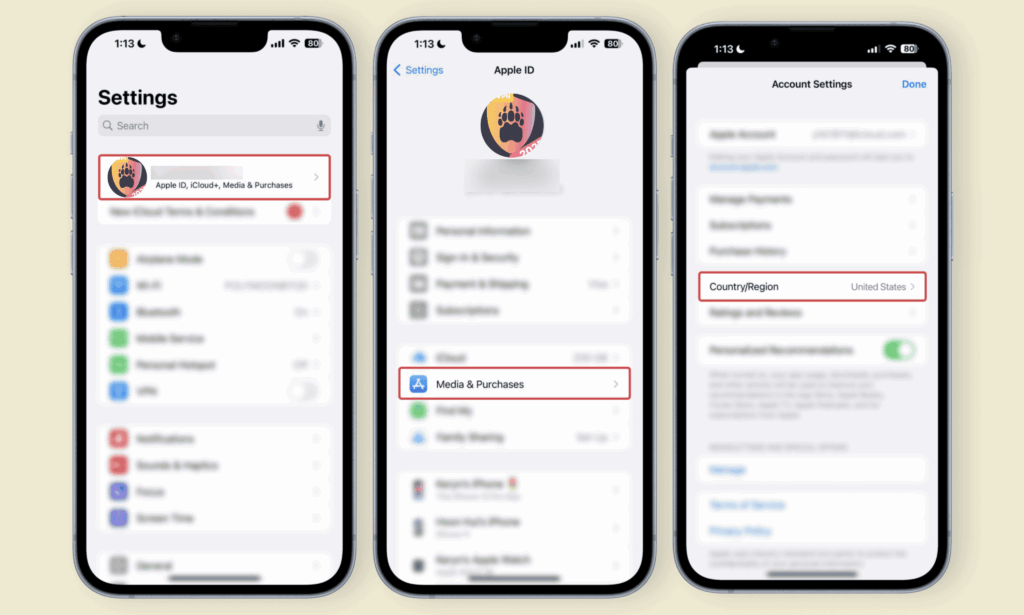
Apple enforces a different, highly frustrating hurdle known as the “Cent Balance Trap.” An Apple ID cannot switch store regions if there is any remaining store credit or gift card balance attached to the account—even a negligible amount like $0.01.
Because Apple does not provide an automated tool to clear fractional balances, users must contact Apple Customer Support directly to request an agent to manually forfeit and wipe the remaining balance. Furthermore, if your Apple ID is currently part of an active Family Sharing group, you must completely disband or exit the family group before the system will allow a country change.
Platform-specific regional constraints matrix
To understand how different digital ecosystems handle region modifications, review this operational comparison matrix:
| Platform ecosystem | Region change cooldown | Leftover balance handling | App update behavior after switch |
| Google Play Store | Strict 365-day lock (Once per year max). | Existing balance remains locked to the previous country profile. | Apps stay installed; updates fail if app is unlisted in new region. |
| Apple App Store | No fixed cooldown (Subject to security flags). | Zero-balance enforced (Must forfeit leftover credit to switch). | Redownloads restricted; requires switching back to original region. |
| Steam (Valve) | 30-day cooldown between region updates. | Wallet currency automatically converts based on current exchange rates. | Store pricing shifts; requires local payment method verification. |
Subscription cancellations and regional app licensing voids
Beyond account balances, changing your country setting severely disrupts active software licenses and recurring billing services.
Active recurring subscriptions (such as Apple Music, YouTube Premium, or local news passes) are strictly bound to the billing country and currency selected during sign-up. When you switch store regions, the platform’s automated billing system attempts to renew the subscription using the new region’s payment rules. If your newly attached credit card does not match the regional billing address or if the specific plan is unavailable in the new country, the subscription will fail and trigger an immediate service suspension.
Furthermore, changing regions creates the App Update Lockdown. When you switch countries, any apps you previously installed that do not exist in the new country’s store will remain on your device. However, you will no longer receive software updates or security patches for those apps. If a critical local banking app or government service app issues a mandatory security update, your device will fail to download the patch because the app is unlisted in your new store region.
The dual-account strategy: A safer alternative to region switching
Given the severe risks of account lock-ins, forfeited balances, and broken app update pipelines, changing the country setting on your primary account is rarely the optimal choice. The most effective workaround for digital nomads and international travelers is the Dual-Account Strategy.
Instead of altering a primary account that holds a decade of purchase history, simply create a secondary, standalone account registered directly in the new country:
- On iOS: Maintain your primary Apple ID for media purchases and iCloud storage. When you need a local app, sign out of the App Store only (leaving iCloud active), sign into your secondary local Apple ID, download the required local app, and sign back into your primary ID.
- On Android: Add a second Google Account to your device settings. The Google Play Store allows you to toggle between multiple active accounts seamlessly, enabling you to download local regional apps via the secondary profile while keeping your primary account untouched.
Utilizing a dual-account setup completely bypasses the 365-day cooldown lock, preserves your store credit balances, and ensures your primary digital library remains permanently safe.