
An existing forum thread can solve a problem faster than a new question, but only when it describes the same conditions. Two users may see the same error message for entirely different reasons. A payment error can result from an expired card, a country restriction, an account setting, an application update, or an interruption at the payment provider.
The value of an old discussion is not limited to its accepted answer. The comments may contain additional logs, unsuccessful attempts, warnings, and a final solution that was discovered months later. Reading the complete discussion can reveal far more than the original question.
The practical goal is to find a thread with the same symptom, product, version, and environment. If no close match exists, the search results should be used to prepare a new question that clearly explains what is different.
The searchable problem signature
A useful search begins with the smallest set of details that uniquely describes the problem. This set can be treated as the problem signature.
For a device issue, the signature may include:
- The manufacturer and product name
- The exact model or hardware revision
- The error message or error code
- The operating-system version
- The action that produces the error
For an application or online service, it may also include the app version, account type, subscription level, country, payment method, browser, or network environment.
Avoid searching with a long conversational sentence such as:
“My phone stopped working after I updated it yesterday, and I do not know what to do.”
Search engines and forum search tools are more likely to find a useful match when the query contains stable technical details:
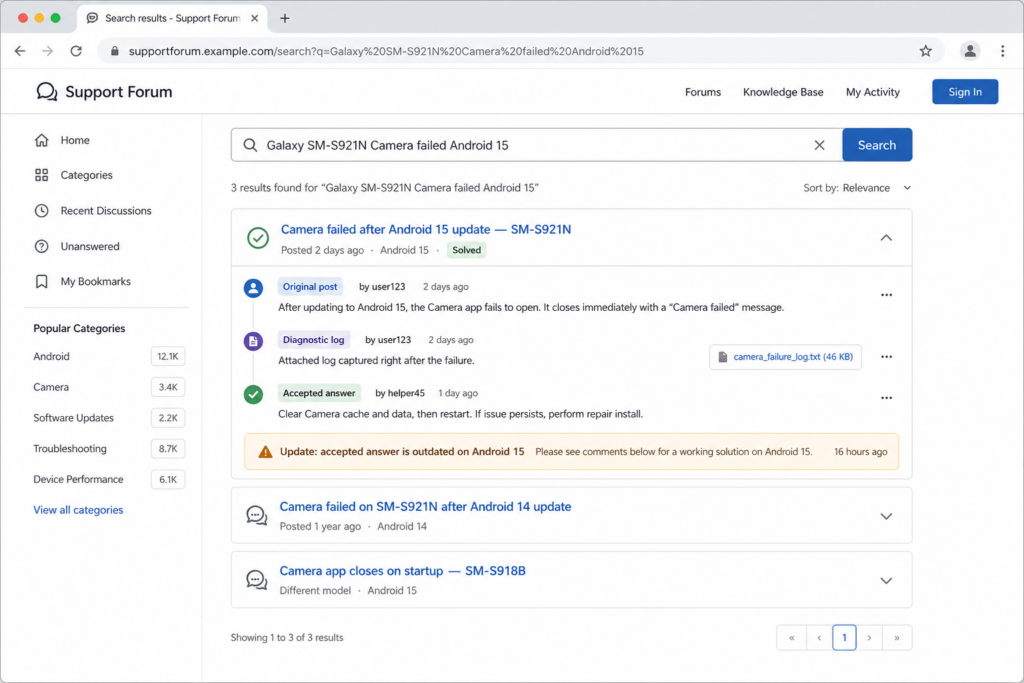
Galaxy SM-S921N "Camera failed" Android 15
Windows 11 24H2 KB number installation error 0x800f081f
App name 8.4 payment failed Korean account
Router model firmware 3.2.1 intermittent disconnect
Quotation marks are helpful for exact error messages, but they can also exclude relevant results when the wording changes slightly between versions. If the exact phrase produces no results, search the error code alone, remove punctuation, or try the main technical terms.
Search both the commercial product name and the model number. Products sold under the same name may contain different hardware in different countries. Conversely, the same device may have different retail names even though the underlying model is closely related.
Error messages should be searched in the language displayed by the product and, when possible, in English. Translated interfaces do not always use the same wording as technical documentation. Searching the original Korean message, an English translation, and the error code can uncover different discussions.
Forum and site-specific searches
General web search is often better than a forum’s internal search tool. Add the site name or use a site filter when a community has a large archive:
site:community.example.com product model error code
site:cafe.naver.com model number update failure
A product forum is useful for model-specific issues, while a developer repository may be better for software bugs and logs. Carrier forums can help with network configuration, and regional communities may contain information about local account, payment, or service restrictions.
Do not rely on the first result. Open several threads and compare their creation dates, last update dates, categories, and product versions. A popular result may rank highly because it has accumulated years of views, not because it applies to the current release.
Search related terms used by other users. A problem described as “login loop” in one thread may appear as “session expired,” “returns to sign-in page,” or “authentication redirect failure” elsewhere. Once a useful technical term appears in a discussion, use it in another search.
Date and version compatibility
The creation date is one of the first details to check. An old answer may refer to a menu that has moved, a setting that was removed, or a download that is no longer available. It may also describe a genuine bug that was fixed in a later update.
Compare at least the following conditions:
| Thread condition | Current condition |
|---|---|
| Product and model number | Exact current product and model |
| Operating system | Current operating-system version |
| App or firmware version | Installed version |
| Account and subscription type | Current account type |
| Country or service region | Current country and profile region |
| Error trigger | Current reproduction steps |
| Proposed menu or feature | Whether it still exists |
| Thread’s last update | Most recent relevant comment |
A difference in a minor version number may be unimportant for a hardware problem but decisive for a software regression. Check release notes, current support instructions, or bug reports to determine whether the affected component changed between versions.
The date of the solution matters as much as the date of the question. A thread created three years ago may contain a current answer posted last week. Another thread created recently may quote an obsolete solution copied from an older discussion.
Version labels can also be misleading. Applications sometimes display separate build numbers, regional versions, or staged-release versions. Record the complete version shown in the application settings rather than relying on the store page.
Diagnostic information in the full discussion
The first post often contains only the visible symptom. The useful diagnostic information tends to appear later, after other members ask questions.
Read the entire thread for details such as:
- Logs and diagnostic codes
- Screenshots of settings or warnings
- Failed repair attempts
- Changes made immediately before the problem
- Results from testing another account, device, or network
- Clarifications about the model or region
- Statements from moderators or developers
- Confirmation that the problem returned
- The final action that resolved the issue
Failed attempts are valuable because they narrow the possible causes. If reinstalling the application did not help, the problem may be connected to the account, remote service, stored system data, or network environment. If another account works on the same device, a hardware failure becomes less likely.
Pay attention to changes in the diagnosis. An early comment may blame the operating system, while later logs show that the actual cause was an expired certificate or server configuration. The discussion should be read as a developing investigation rather than a collection of independent tips.
Page-search tools can help with long threads. Search for the model number, version, error code, “resolved,” “fixed,” “update,” “log,” “workaround,” and “did not work.” These words are navigation aids, not proof that the surrounding advice is correct.
Accepted answers and later conclusions
An accepted answer usually means that it helped the person who asked the original question. It does not guarantee that the answer remains current or that it applies to every device and account.
Read the comments posted after the accepted answer. Later users may report that the method stopped working after an update, applies only to one region, or creates an additional problem. A moderator may add a corrected procedure without changing the accepted label.
When the accepted answer conflicts with newer evidence, give priority to the most recent conclusion that matches the current version and is supported by a clear explanation. Check whether the product vendor, developer, or forum moderator has confirmed the change.
The number of positive comments is not a substitute for compatibility. Twenty users may have succeeded because they used the same old model, while the current device has a different recovery system. Statements such as “worked for me” should be evaluated alongside the commenter’s model, version, and environment.
A useful solution explains why the action works, what it changes, and how to reverse it. A command or download posted without context deserves more caution, even when several people recommend it.
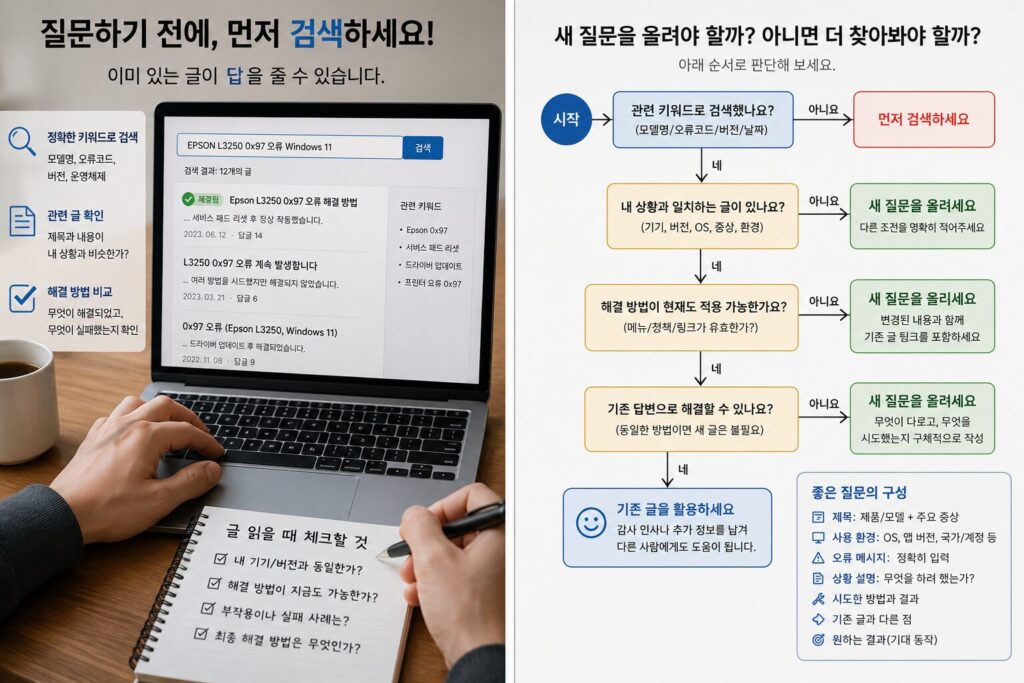
Differences requiring a new question
A new question is appropriate when an important condition differs from every relevant thread. Minor differences in screen layout may not matter, but changes in the operating system, country, account type, hardware revision, or reproduction steps can point to a different cause.
Consider starting a new discussion when:
- The existing thread covers another operating system or major release
- The model number or hardware revision is different
- The service behaves differently in your country
- The old thread uses a personal account and your problem involves a business, child, school, or managed account
- The error occurs through a different sequence of actions
- The old solution refers to a discontinued feature
- The problem remains after completing the confirmed solution
- The proposed fix causes a new error
- Existing answers conflict on a security-sensitive action
- No thread reproduces the problem consistently under your conditions
State the difference in the first paragraph of the new question. This prevents other members from dismissing it as a duplicate and directs attention to the condition that may explain the problem.
A useful opening might read:
“I found an earlier thread about this error on Android 14. My case occurs on Android 15 after updating the application to version 8.4. The previous menu no longer exists, and the error can be reproduced every time a Korean business account confirms payment.”
This paragraph shows that the archive was searched and explains why the old answer is insufficient.
Risk assessment before repeating a solution
Some forum fixes are easy to reverse. Others can delete personal data, interrupt service, invalidate a warranty, or lock an account. The consequences should be checked before testing the solution.
Use additional caution with instructions involving:
- Factory resets
- Deletion of application data
- Disk formatting or partition changes
- Firmware installation or downgrades
- Bootloader unlocking
- Registry or system-file changes
- Account deletion or regional changes
- Password, recovery-key, or authentication resets
- Payment profile changes
- Unofficial software, drivers, or download links
Before deleting data, confirm exactly what will be removed. Clearing an application cache is different from clearing all application storage. Removing a local account may also delete files that have not completed cloud synchronization.
Check the backup and restoration requirements. A backup is useful only if it contains the required data, can be opened, and can be restored to the current product version. Confirm the latest backup date and test access to essential files where practical. Record recovery keys, authentication methods, and account credentials without posting them publicly.
Firmware changes require the correct model, region, hardware revision, power conditions, and recovery procedure. A file for a similarly named product may still be incompatible. Use the manufacturer’s instructions and downloads whenever available.
Account resets deserve similar caution. Confirm whether purchases, subscriptions, family relationships, saved data, usernames, or recovery options will survive the reset. Do not change a permanent account setting to solve a temporary problem without reviewing the rules for changing it back.
A controlled testing order
When a thread appears relevant, begin with the least disruptive action. Check settings and service status before reinstalling software or resetting the device. Test one change at a time so that the result remains understandable.
A reasonable order is:
- Record the current settings, versions, and exact error.
- Check official service status and current support documentation.
- Repeat the problem using the documented reproduction steps.
- Test a reversible setting or another network, browser, or account where appropriate.
- Back up relevant data.
- Apply the confirmed solution for the matching model and version.
- Record the result before making another change.
- Restore the previous state if the method fails and reversal is supported.
Avoid combining several suggestions from different comments. If the problem disappears after multiple simultaneous changes, it becomes difficult to identify the cause or determine which change should be reversed.
The structure of a useful new question
A new post should contain enough information for another person to reproduce and diagnose the problem without requesting basic details.
Include:
- Product name and exact model number
- Operating system, application, driver, or firmware version
- Country, account type, and service provider when relevant
- Exact error message or code
- Steps that reproduce the problem
- Expected result and actual result
- The time the problem began
- Recent updates or configuration changes
- Solutions already attempted and their results
- Links to related threads
- The specific difference between those threads and the current case
Place the main difference near the beginning, not at the end of a long post. Use a title containing the product, version, and symptom.
Instead of “The app does not work,” write:
“Payment confirmation fails with error P-204 in Android app 8.4 on a Korean business account.”
Logs and screenshots may help, but remove names, email addresses, phone numbers, order numbers, payment details, authentication codes, IP addresses, cookies, access tokens, and recovery keys.
An existing discussion is the better route when the model, version, environment, and symptom match and the current comments confirm a safe solution. A new question is warranted when a meaningful condition differs or when the available solution carries unresolved risk. In both cases, careful searching turns a vague problem into a defined technical case.